← All products · Step 2 · Prove
ProveOut 360-VT
Runs the posted program on a virtual twin of your own MULTUS, so you see the whole job before the first chip.
▶ The 2-minute overview · captions, so it works with the sound off
← All products · Step 2 · Prove
Runs the posted program on a virtual twin of your own MULTUS, so you see the whole job before the first chip.
▶ The 2-minute overview · captions, so it works with the sound off
ProveOut 360-VT · Virtual Twin
The mill-turn machine simulation Fusion does not have, integrated with Fusion. Fusion simulates the toolpath, but it does not simulate the machine for Mill-Turn setups. On a Multus, that means the first time you see the B-axis head, both spindles, the part transfer and every tool change working together is on the real machine. ProveOut 360-VT closes that gap: it runs the program you posted from Fusion on a virtual twin of your Multus and shows you the whole job, the material coming off included, before the first chip.
The twin is not a generic model. It is built from your machine's own data on the OSP-P500: its machine model and work holding, the tools actually loaded in its magazine with their real lengths, and its own G and M code macros. What you prove on the twin is what that machine is set up to do.
And when the job runs, the twin can mirror the real machine in real time. Sit in the office and watch the Multus out in the shop run the program, every move and every tool change, live on your screen. If something looks wrong, the programmer can stop it from the desk.
Next-Gen VT · 360 Virtual Twin
It knows the Fusion part model and the model of your machine at once, so it finds a wrong hole, extra stock or an over-cut, not only a collision.
The twin follows the real machine in real time, in any office. Check in on the job, and stop it if needed with the password-protected remote stop.
Every operation, toolpath and cutter from Fusion, tied to the exact program the SP post wrote.
With MachinePulse 360, the real spindle and axis loads from the drives, line by line and tool by tool.
Cycle time worked out with each axis’s own acceleration and the real tool changes, not just distance over feed.
Your machine’s own tools, work holding and macros, both spindles and the part transfer, and the finished part against the Fusion model.
A new generation of virtual twin
ProveOut 360-VT understands both models at once: the Fusion CAD/CAM model of the part and the model of your machine. Full CAD, CAM and machine awareness, in one twin.
The control’s CAS
Okuma’s Collision Avoidance System protects the machine: it stops the head, a tool or a chuck before it hits something. It does not know what the finished part is supposed to look like.
ProveOut is model aware
It checks the machine and the part. A hole where the model has none, stock left on a face, a cut that goes too deep: each one is shown on the part, coloured by how far off it is, before the first chip.
Follow it from any office
The twin follows the real machine in real time, so a programmer can check in on the job from their desk, and stop it if needed: a password-protected remote stop. Every stop is logged.
Both stay on: CAS guards the machine while it runs, ProveOut proves the part before it runs. The remote stop is not an emergency stop; the E-stop at the machine is always the way to stop it at once.
Follow Mode, on our own Multus
The program runs on the machine. ProveOut 360-VT reads the control and moves the twin with it: first the Okuma screen with the twin on the laptop below it, then the real Multus through the window, the twin keeping up beside it.
How it connects
1 · Fusion
Program as you always do. One click in the Manufacture workspace sends the part model to ProveOut.
2 · Post
The SP post writes the exact program the Multus will run. That program is what the twin runs.
3 · Your Multus
The P500 supplies its own machine model, work holding, loaded tools and macros. It only reads from the control; the one thing it can send is the password-protected remote stop.
4 · The twin
The program runs on the twin. A collision, an overtravel or a missing tool is flagged at the line that causes it.
5 · Run
Run the proved program, and watch it from the office: the twin mirrors the real machine in real time, and a remote stop is there if something looks wrong.
A pre-check, not a replacement: the control's own interference checking stays on while the real machine runs. ProveOut tells you before you get there.
Why this twin is different
Built for one machine
A general-purpose simulator has to approximate hundreds of machines. ProveOut is built for the Okuma Multus and its OSP-P500 alone: the B-axis head, both spindles, the tool changer and the control’s own codes, taken from the machine itself.
One system, CAM to machine
Every SP Tooling 360 module talks to the twin. The Fusion add-in sends the part model, the SP post writes the program, MagazineDumper and Tool Sync 360 supply the tools, and MachinePulse 360 brings in the real machine’s drives, sensors and probe results as it runs.
Built on open platforms
Autodesk Fusion’s API and Okuma’s open OSP control, “Open Possibilities”, give direct access to the program, the part model and the machine’s own data. That is what lets us do it right, instead of guessing from the outside.
That is a depth of integration, from CAM to the machine, that a general-purpose simulator cannot reach.
A twin that works both ways
From CAM · Fusion
→ ←
ProveOut 360-VT
From the machine · OSP-P500
Full data logging, mapped to the cut. Every reading from the machine is logged around the clock and placed on the exact toolpath and cutter that was cutting at that moment. When something changes during a run, a load climbing on one tool or the coolant warming up, you see it on the twin, on the toolpath where it happened, while the job is still running and not in a spreadsheet afterwards.
We believe ProveOut 360-VT is the only virtual twin that works both ways: data from CAM and from the machine, merged in one place.
What you see before the first chip
The whole machine
Not just the toolpath: the B-axis head, both spindles, the chucks and jaws, the part transfer and the tool changer, moving as the program commands them.
Collisions, found early
Head, holder, tool, chuck and part are checked as the program plays. The problem is shown at the line that causes it, before the machine gets there.
Your real tools
The program’s tools are checked against what is actually loaded in the magazine, with their real lengths. A tool that is not there is flagged before you press Cycle Start.
The part, as cut
Watch the stock become the part, coloured by the tool that cut each face, then compare the finished part with the Fusion model.
Both machines
Each Multus has its own twin, from its own data. Prove the program on the machine that will run it.
Watch the shop from the office
Together with MachinePulse 360, the twin mirrors the real Multus in real time: the program running out in the shop, live at your desk. Every run can be recorded and compared with the next one.
See it run
The Virtual Twin in 38 seconds · the real Multus and its twin side by side: the magazine, six tools cutting, 5-axis swarf between spindles, the part-off and the heat map
Demo 1 · One part, start to finish: facing, the B-axis tilt, the part-off and the bar pull, then the part against the Fusion model
Demo 2 · A second part: 5-axis swarf on the twin, then its heat map, the OK band set live, the Fusion model on its own and a section view
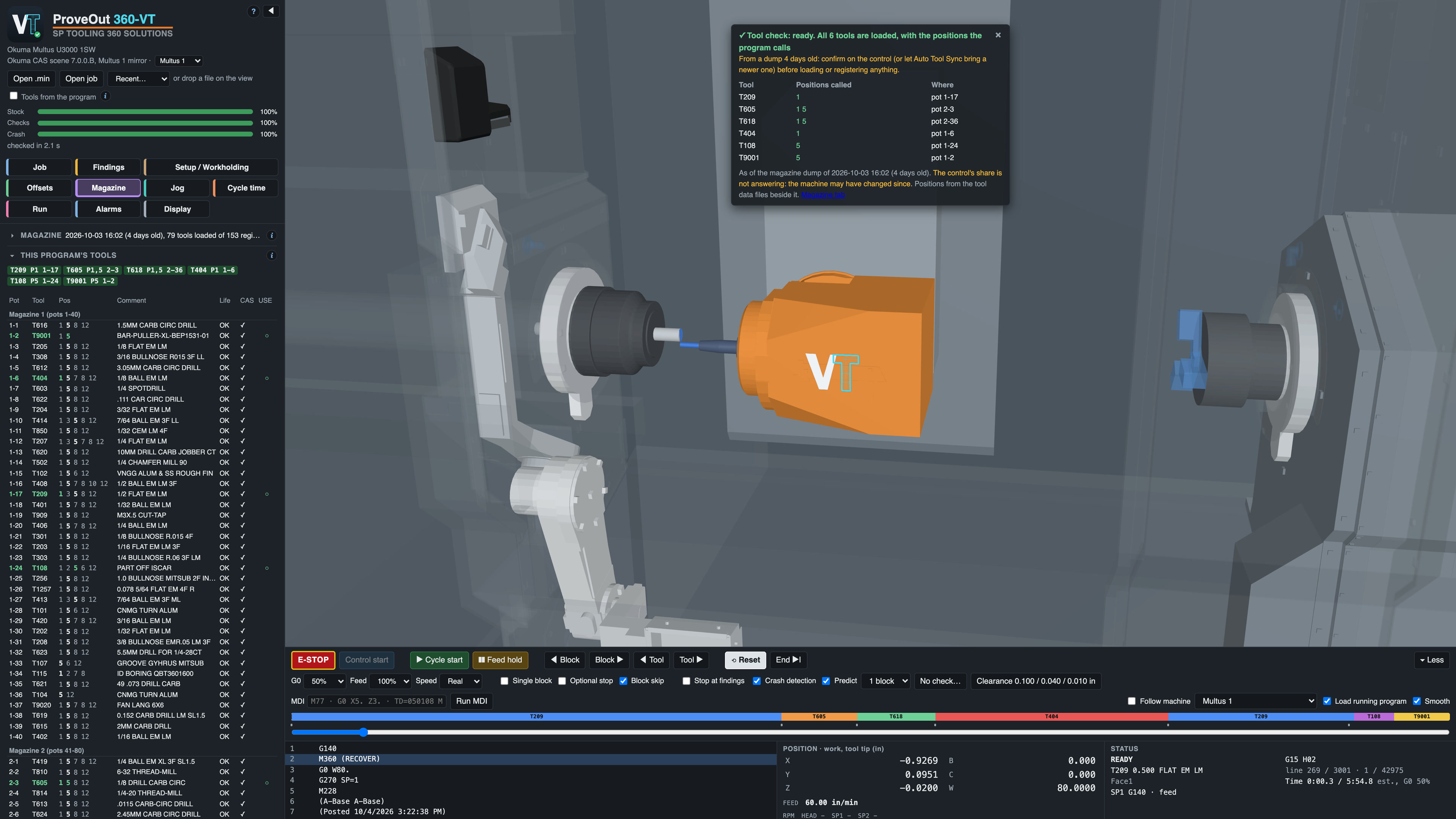
The virtual twin: every tool the program calls, checked against the magazine
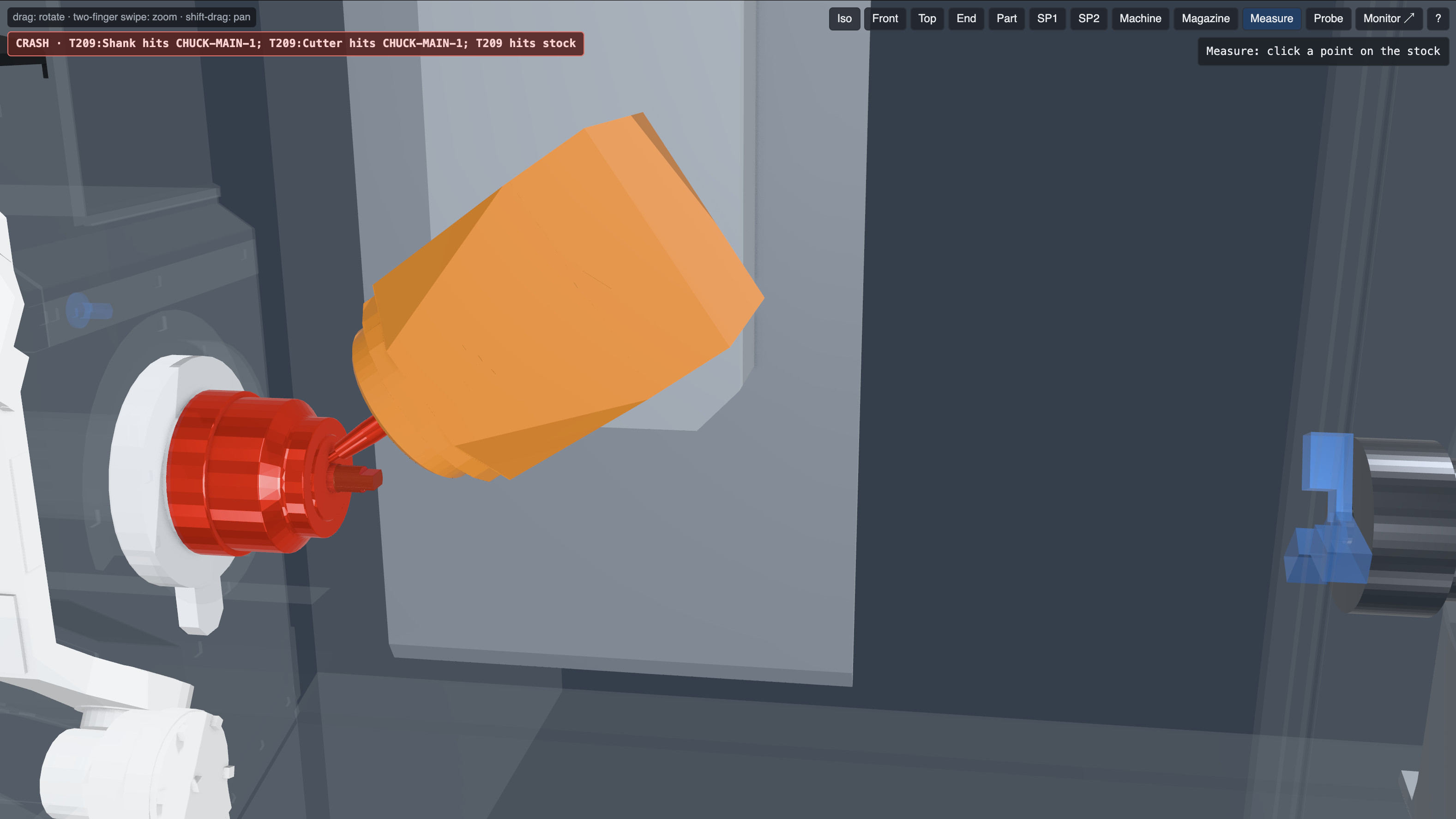
A collision caught before the machine: T209 into the main chuck
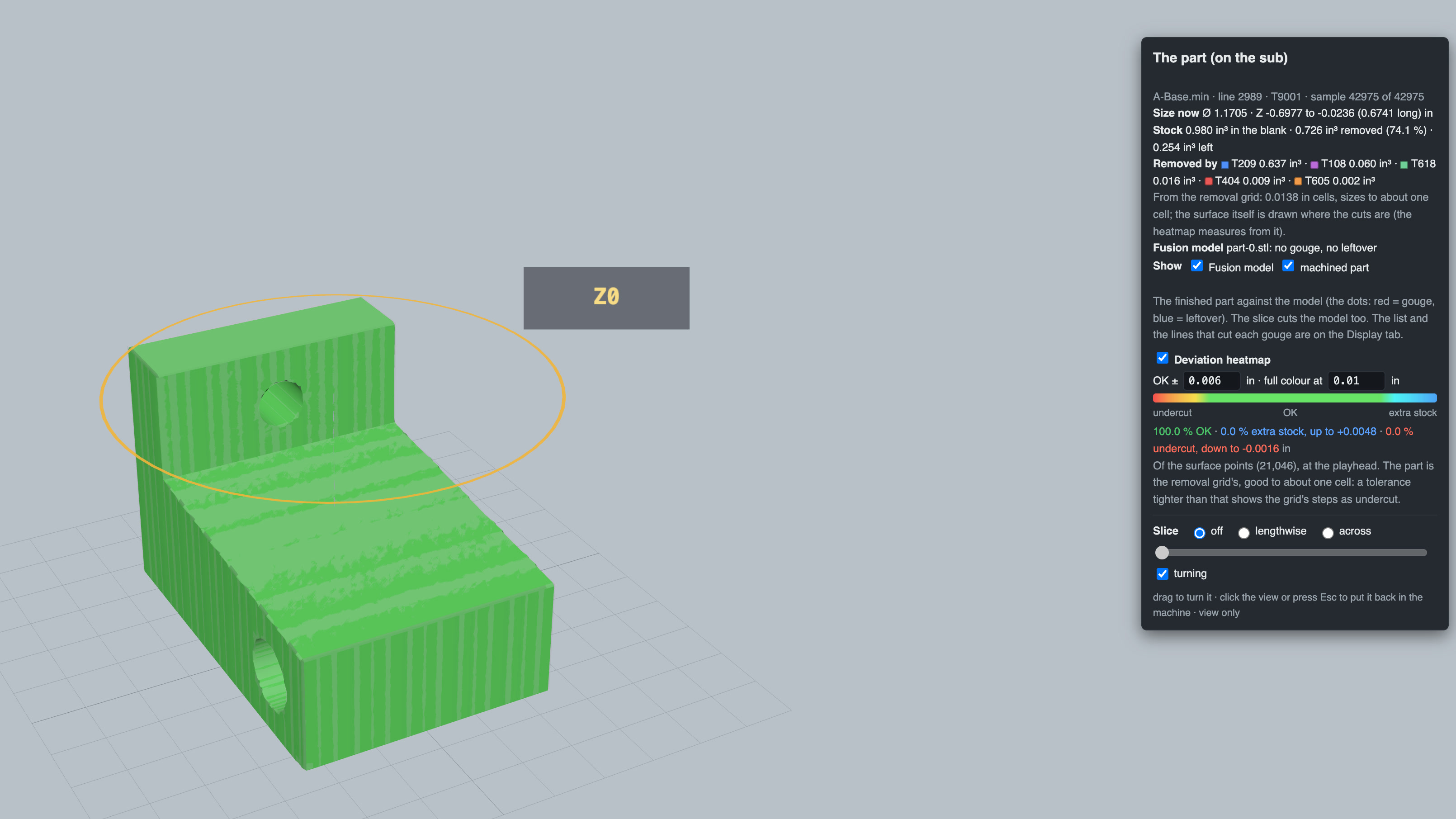
The finished part against the Fusion model: no gouge, 100 % inside ± 0.006 in
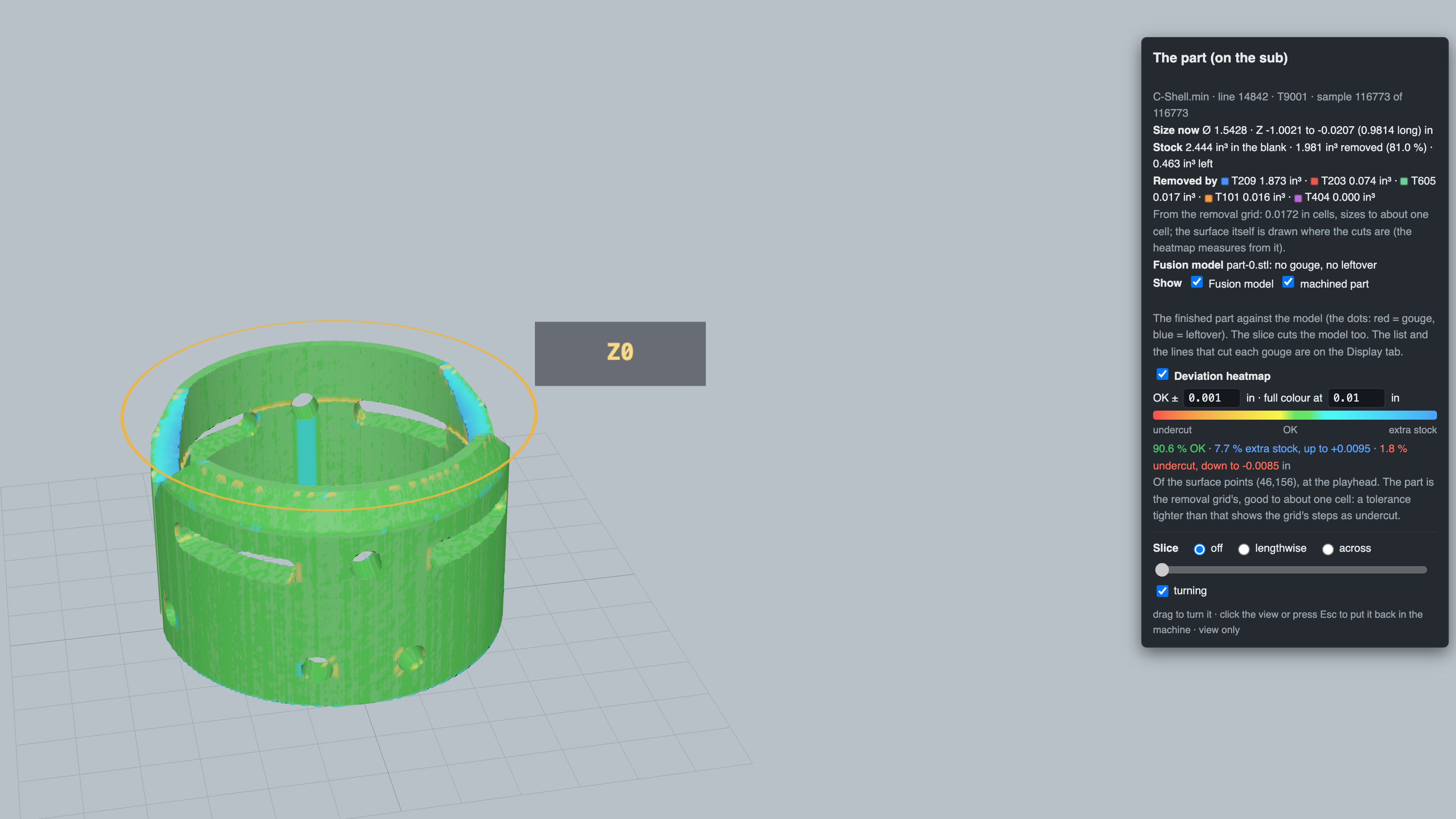
A second part on the tolerance heat map at ± 0.001 in: green is in the band, blue is extra stock
Get in touch for pricing, a demo, or to talk shop. Built by machinists — happy to talk machinist.
Thanks, we have your request. We will email you to set up a time.